TypeScript
认识 TypeScript
类型缺失的 JavaScript
-
其实上由于各种历史因素,JavaScript 语言本身存在很多的缺点
- 随着 ECMAScript 不断提出的新特性,让这门语言更加现代、更加安全、更加方便
- 然而到目前为止,JavaScript 在类型检测上依然是毫无进展
-
缺失类型带来的问题
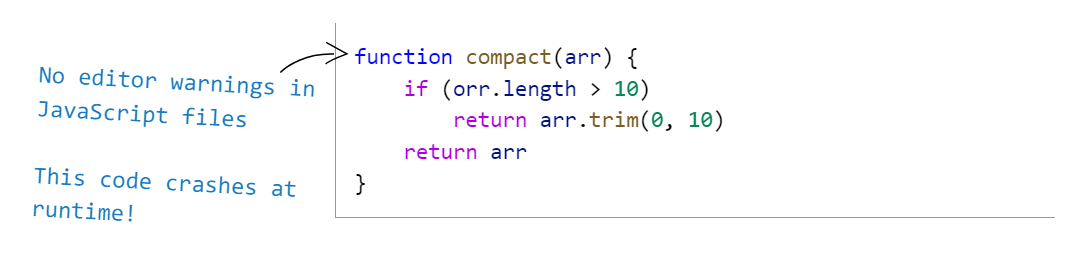
- 无法在代码编译期间就发现代码错误,许多错误必须要等到代码执行时才能发现
- 对于工具/框架的开发者,无法给使用者提供类型提示,还需要对各种错误边界进行处理
- 尤其是对于 JavaScript 这一单线程语言而言,错误会导致后续的代码都无法执行
-
为了弥补 JavaScript 类型约束上的缺陷,许多公司推出了自己的方案
-
2014 年,Facebook 推出了 flow 来对 JavaScript 进行类型检查
-
同年,Microsoft 也推出了 TypeScript 1.0 版本
-
目前,TypeScript 已经成为了最为流行的 JavaScript 超集
-
定义和特点
定义
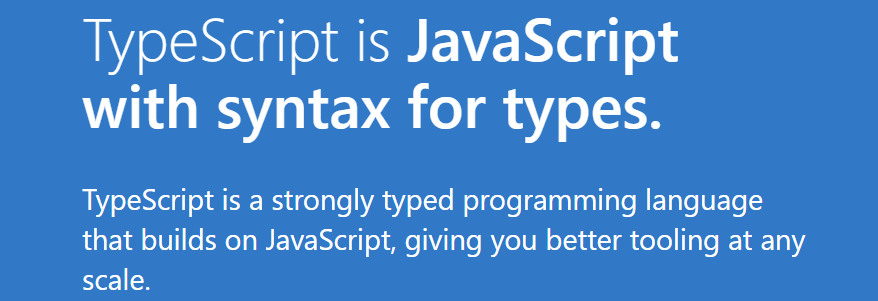
- 官方定义:TypeScript is JavaScript with syntax for types
- TypeScript 是拥有类型的 JavaScript 超集
特点
-
始于 JavaScript,归于 JavaScript
- 基于 JavaScript 进行构建,包含 JavaScript 的所有语法特性
- 可以编译成普通、干净、完整的 JavaScript 代码
-
拥有先进的 JavaScript
- 包含 ECMAScript 和 未来提案 中的特性
- 对原有的 JavaScript 进行了语法扩展,同时也可以编译成向下兼容的代码
-
是一个强大的工具,用于构建大型项目
-
静态语法分析可以实时分析代码错误
-
类型是可选的,强大的类型推导能力
-
运行环境
-
方式一:使用
ts-node工具(Node.js 环境)# 对于 ts-node 工具包,全局安装即可
npm i -g ts-node tslib @types/node
# 运行 ts 文件
ts-node index.ts -
方式二:使用
webpack搭建环境(浏览器环境)import { resolve } from "path";
import { Configuration } from "webpack";
import HtmlWebpackPlugin from "html-webpack-plugin";
const config: Configuration = {
mode: "development",
devtool: "source-map",
entry: "./src/index.ts",
output: {
filename: "bundle.js",
path: resolve(__dirname, "./build")
},
module: {
rules: [
{
test: /\.ts$/,
use: "ts-loader"
}
]
},
resolve: {
extensions: [".ts", "..."]
},
plugins: [
new HtmlWebpackPlugin({
template: resolve(__dirname, "./index.html")
})
]
};
export default config;
变量声明
类型注解
-
在 TypeScript 定义变量(标识符)和 ES6 之后一致,可以使用
var/let/const来定义 -
在 TypeScript 中定义变量需要指定标识符的类型
-
声明类型后就会开启 类型检测,声明的类型可以称之为类型注解
-
完整的声明格式
var/let/const 标识符: 数据类型 = 赋值; -
TSLint 不推荐使用
var来声明变量
-
-
在 TypeScript 中的类型声明与 JavaScript 中数据的包装类型是两个不同的概念
/*
* string: TypeScript中字符串的类型
* String: JavaScript中字符串的包装类
*/
const str: string = 'Hello, TypeScript!';
类型推导
-
变量初始化值时,TypeScript 会根据初始化的值进行类型推导,自动推导出变量的类型
/*
* message 变量会自动推导为 string 类型
*/
let message = "Hello World!";

// Error: 不能将类型“number”分配给类型“string”
message = 22; -
使用
let声明推导出来的类型比const更为宽泛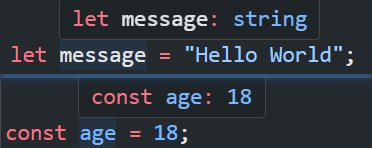
/*
* message 变量推导为 string 类型
*/
let message = "Hello World";

/*
* age 变量推导为字面量类型 18
*/
const age = 18;
数据类型
JavaScript 类型
number
-
与 JavaScript 一样,TypeScript 不区分整数类型和浮点型,统一为
number类型const num: number = 10; -
TypeScript 同样支持二进制、八进制、十六进制的表示
const n1: number = 0b101;
const n2: number = 0o123;
const n3: number = 0xff;
bigint
-
bigint用于表示绝对值大于或等于 2^53 的数字const number: bigint = 12345678900000001n; -
使用
typeof测试时,返回"bigint"typeof 1n === "bigint"; // true
boolean
boolean 类型只有两个取值:true 和 false
let flag: boolean = true;
flag = Date.now() % 2 === 0;
string
string 类型表示字符串类型,可以使用单引号或者双引号表示
const message: string = "Hello World";
null / undefined
-
在 JavaScript 中,
undefined和null是两个基本数据类型 -
在TypeScript中,它们既是实际的值,也是自己的类型
const s1: null = null;
const s2: undefined = undefined;
symbol
symbol 表示符号类型,用于生成一个独一无二的值
const t1 = Symbol('title');
const t2 = Symbol('title');

const info = {
  [t1]: 'a',
  [t2]: 'b'
};
Array
-
Array用于表示数组类型,数组中存放的元素属于同一类型 -
数组类型存在两种定义方式
-
类型[]方式const arr: number[] = [1, 2, 3]; -
Array<类型>方式(泛型)const arr: Array<string> = ['JavaScript', 'TypeScript'];
-
object
-
object表示对象类型,但是此类型约束表示的是空对象,无法添加属性和方法const info: object = {};
/*
* 类型“object”上不存在属性“name”
*/
info.name = ''; -
通常使用接口
interface来约束对象的属性和行为interface Info {
name: string;
age: number;
}
const info: Info = {
name: 'Avril',
age: 17
};
TypeScript 扩展类型
any
-
无法确定一个变量的类型,并且可能它会发生一些变化,这种情况使用
any类型 -
一旦使用了
any类型,TS 会关闭对其的类型检测- 此时所有的操作都变成合法的
- 这会带来类型安全问题,要尽量避免使用
any类型
const num: any = 10;
/*
* 类型安全隐患
*/
num.length = 10;
num.split(''); -
any类型的变量可以赋值给任意类型let a: any = "str";
a = 123;
a = false;
unknown
-
unknown类型用于描述类型不确定的变量- 与
any相反,其做任何操作都是不合法的 - 必须要先进行类型缩小后,才可以进行对象类型的操作
function foo(variable: unknown) {
  if (typeof variable === "number") {
    console.log(variable.toFixed(2));
  } else if (typeof variable === 'string') {
    variable.split(' ');
  }
} - 与
-
只能赋值给
any和unknown类型,防止去干扰其他确定的类型let b: unknown;
/**
* 不能将类型“unknown”分配给类型“string”
*/
const c: string = b;
void
-
void通常用来指定一个函数是没有返回值- 可以将
undefined赋值给void类型
function foo(): void {
  console.log(11);
  return undefined;
} - 可以将
-
当基于上下文的类型推导出返回类型为 void 的时候,并不会强制函数一定不能返回内容
const numbers = [1, 2, 3];
/**
 * forEach 传入的回调函数没有返回值,但在此处也可以返回值
 */
numbers.forEach(n => n.toFixed(2));
never
-
never表示永远不会发生值的类型- 比如一个函数中是一个死循环或者抛出一个异常,此时函数无返回值,可以指定为
never类型
function throwError(): never {
  throw new Error('error');
} - 比如一个函数中是一个死循环或者抛出一个异常,此时函数无返回值,可以指定为
-
应用场景:强制完成类型穷举
/**
 * 接收 string/number 类型参数,强制对类型进行完整穷举
 */
function getType(variable: string | boolean) {
  switch (typeof variable) {
    case 'string':
      console.log('string类型');
      break;
    default:
      /**
       * 编译时就会报错 (不能将类型“boolean”分配给类型“never”)
       * 强制要求完成类型穷举
       */
      const extract: never = variable;
  }
}
tuple
-
tuple表示元组类型(固定长度的数组)- 相比数组,元组可以存放不同类型的元素,并且可以指定每一个元素的类型
- 元组中每个元素都有自己特定的类型,根据索引值获取到的值可以得到确定的类型
const tuple: [string, number] = ['aaa', 11];
const [str, num] = tuple;

console.log(str.charAt(1));
console.log(num.toFixed(2)); -
元组类型通常用于指定函数返回值的类型
function useState<T>(init: T): [T, (v: T) => void] {
  const state = init;
  const setState = (newValue: T): void => {};

  return [state, setState];
}
enum
-
enum表示枚举类型- 枚举就是将一系列可能的值,一个个列举出来定义在一个类型中
enum Gender {
  MALE,
  FEMALE
}

const male: Gender = Gender.MALE; -
枚举类型默认是有值的
-
默认从
0开始依次递增,如果改变了一个枚举的数值,后续未定义的枚举会以此依次递增enum Gender {
MALE = 100,
FEMALE
}
const male: Gender = Gender.FEMALE;
console.log(male === 101); // true -
也可以使用其他类型(常量或计算值)作为枚举类型的值
/*
* 常量
*/
enum Direction {
  Up = "UP",
  Down = "DOWN",
  Left = "LEFT",
  Right = "RIGHT",
}

/*
* 计算值
*/
enum FileAccess {
  // constant members
  None,
  Read = 1 << 1,
  Write = 1 << 2,
  ReadWrite = Read | Write,
  // computed member
  G = "123".length,
}
-
-
使用数字枚举成员的枚举类型支持反向映射
enum Direction {
  LEFT,
  RIGHT
}

const left = Direction.LEFT;
console.log(Direction[left]); // "LEFT"
类型系统
类型别名和接口
类型别名 type
类型别名使用 type 关键字,可以对需要复用的类型进行抽取
type IDType = string | number;
const variable: IDType = 11;
接口 interface
-
接口使用
interface关键字,主要用于声明对象类型interface Info {
name: string;
id: string;
} -
对于对象类型,属性支持额外的修饰符
?:可选属性,可选属性是声明类型和undefined的联合类型readonly:只读属性,只允许读取,不可重写
interface Position {
  x: number;
  readonly y: number;
  z?: number;
}

const position2d: Position = { x: 100, y: 100 };
// position2d.y = 200; 不可进行属性值重写
const position3d: Position = { x: 100, y: 100, z: 100 }; -
通过
接口["成员属性"]的方式可以访问接口成员的类型interface IPerson {
name: string;
hobbies: string[];
}
// type A = string[]
type A = IPerson["hobbies"];
类型别名和接口区别
-
类型别名通常用于定义 非对象类型,接口通常用于定义对象类型
- 类型别名可以声明任意类型
- 接口只能声明对象类型和函数签名
-
类型别名不可重复声明
- 接口可以重复声明,且类型声明会进行合并
- 合并时,同一属性的类型需要相同
interface Person {
  name: string;
}

interface Person {
  age: number;
}

const person: Person = {
  name: 'Avril',
  age: 17
}; -
接口可以使用继承 等扩展语法
联合类型
-
联合类型是由两个或者多个其他类型组成的类型,使用
|操作符- 表示可以是这些类型中的任何一个值
- 联合类型中的每一个类型被称之为联合成员
interface Info {
  id: string | number;
  name: string;
}

const info: Info = { id: 10, name: 'Enemy' };
const info2: Info = { id: '_10032104', name: 'Airwaves' }; -
在使用联合类型的变量时,需要进行类型缩小后再使用
function getLength(id: string | number) {
  if (typeof id === 'string') {
    return id.length;
  }
  return id.toString().length;
}
交叉类型
-
交叉类型表示需要同时满足多个类型的条件,使用
&操作符- 使用交叉类型,在定义类型时可以对原有类型进行扩展
interface Info {
  name: string;
  color: string;
}

interface IAction {
  run: () => void;
}

const dog: IAction & Info = {
  name: '小白',
  color: 'white',
  run() {
    console.log(`${this.name} is running!`);
  }
} -
对两个无交集的类型进行交叉,会得到
never类型/**
* type ID = never
*/
type ID = number & string; -
对两个联合类型进行交叉,会取交集
type T1 = number | string;
type T2 = string | boolean;

/**
 * type T = string
 */
type T = T1 & T2;
类型断言
-
使用
as关键字进行类型断言,可以缩小类型范围/**
* 将 Element 类型断言为 HTMLDivElement
*/
const div = document.querySelector('#root') as HTMLDivElement; -
只允许类型断言转换为 更具体 或者 不太具体 的类型范围
/**
 * 向更具体的类型进行断言
 */
const v1: string | undefined = '11';
const v2 = v1 as string;

/**
 * 向更宽泛的类型进行断言(不推荐,可能出现类型安全问题)
 */
const v3: string = '22';
const v4 = v3 as any; -
使用
!可以进行非空断言,去除类型中的undefined/null类型- 除非确定值一定存在,否则非空断言会导致类型安全问题
/**
 * 去除获取的 null 类型
 */
const { scrollTop } = document.querySelector('div')!;
字面量类型
-
字面量类型类似于枚举,将取值在有限的范围内
- 字面量类型结合联合类型,可以实现枚举的效果,并且可以获取很好的代码提示
type Direction = 'left' | 'right';

function action(direction: Direction) {
  if (direction === 'left') {
    console.log('Turn Left');
  } else {
    console.log('Turn Right');
  }
} -
对象在进行字面量推理的时候,会推导为更通用的类型
- 添加
as const可以强制推导成字面量类型
/**
 * const info: {
    readonly name: "Avril";
    readonly age: 17;
  }
 */
const info = {
  name: 'Avril',
  age: 17
} as const; - 添加
类型缩小
类型缩小旨在将不确定的类型向确定的类型缩小
typeof
-
在 TypeScript 中,
typeof是一种类型保护- 在
typeof的条件作用域内,类型会被缩小约束
function getLength(id: string | number) {
  if (typeof id === 'string') {
    return id.length;
  }
  return id.toString().length;
} - 在
-
除了能用于类型保护外,
typeof还可以获取一个标识符的类型,起到提取类型的作用const info = {
name: 'Avril',
age: 17
};
/**
* type ID = {
name: string;
age: number;
}
*/
type ID = typeof info;
平等缩小
使用 switch 或相等的一些运算符(===、!==)来表达相等性
function action(direction: 'left' | 'right') {
  if (direction === 'left') {
    console.log('Turn Left');
  } else {
    console.log('Turn Right');
  }

  switch (direction) {
    case 'left':
      console.log('Turn Left');
      break;
    case 'right':
      console.log('Turn Right');
  }
}
instanceof
使用 instanceof 检查一个值是否是另一个值的 实例
function validateJson(json: string) {
  try {
    JSON.parse(json);
    return true;
  } catch (error) {
    return error as Error;
  }
}

const result = validateJson("{}")

if (result instanceof Error) {
  console.log(result.message);
}
in
in 操作符用于确定对象是否含有给定名称的属性
interface Teacher {
  teaching: () => void;
}

interface Student {
  studying: () => void;
}

function action(person: Teacher | Student) {
  if ('studying' in person) {
    /**
     * 此作用域内确定为 Student 类型
     */
    person.studying();
  } else {
    /**
     * 此作用域内确定为 Teacher 类型
     */
    person.teaching();
  }
}
函数类型
函数类型声明
函数类型表达式
-
在 TypeScript 中,通过编写函数类型表达式可以约束函数的类型
- 语法:
(参数: 类型) => 返回值类型 - 不同于其他编程语言,参数列表中的形参名称不能省略
type Sum = (n1: number, n2: number) => number;

const sum: Sum = (n1, n2) => n1 + n2; - 语法:
-
声明函数时,形参的个数可以少于类型声明中的参数个数
- 类型声明中多余的形参会被忽略
- 但声明函数时,形参个数不能多于类型声明中的个数
In JavaScript, if you call a function with more arguments than there are parameters, the extra arguments are simply ignored. TypeScript behaves the same way.type Sum = (n1: number, n2: number) => number;
/*
* 无报错
*/
const sum1: Sum = (n1) => n1 * 2;
/**
* Target signature provides too few arguments. Expected 3 or more, but got 2
*/
const sum2: Sum = (n1, n2, n3) => n1 + n2;
调用签名
在 JavaScript 中,函数除了可以被调用,也可以有属性值
-
函数类型表达式只能表达一个可以被调用的函数,无法为函数添加属性
-
此时可以使用接口为函数添加属性,同时使用调用签名声明函数的调用类型
-
调用签名语法:
(参数: 类型): 返回值类型
interface Sum {
  description: string;
  (n1: number, n2: number): number;
}

const sum: Sum = (n1, n2) => n1 + n2;
sum.description = '两数之和';
构造签名
在 JavaScript 中,函数也可以被当作一个构造函数 通过 new 进行调用
- 此时可以为函数类型添加构造签名,只需在 调用签名 前面添加
new操作符
type SomeConstructor = {
  new (name: string): Dog;
};

function fn(ctor: SomeConstructor) {
  return new ctor("hello");
}

class Dog {
  name: string;
  constructor(name: string) {
    this.name = name;
  }
}

fn(Dog);
函数参数类型
可选参数
-
在声明函数的参数类型时,可以为参数名称添加
?后缀,表示此参数是可选的- 添加可选类型后,此参数的类型相当于给定类型与
undefined的联合类型
function sum(x: number, y?: number) {}

sum(1);
sum(1, 2); - 添加可选类型后,此参数的类型相当于给定类型与
-
可选参数需要放在必选参数的后面
默认参数
-
在声明函数的参数类型时,可以为参数赋予默认值
- 默认参数不需要添加类型注解,TS 会根据默认值自动进行类型推导
- 对于默认参数,可以显式的传递
undefined(会被忽略),此时也会使用函数声明的默认参数
function drawCircle(radius: number, x = 0, y = 0) {
  const ctx = document.querySelector('canvas')!.getContext('2d') as CanvasRenderingContext2D;

  ctx.arc(x, y, radius, 0, Math.PI * 2);
}

/**
 * 此时 x 仍然会以 0 进行运算
 */
drawCircle(50, undefined); -
同样,默认参数也需要放在必选参数的后面
剩余参数
-
TS 同样支持剩余参数,剩余参数会以数组的形式进行存放
const sum = (init: number, ...args: number[]) => args.reduce((pre, cur) => pre + cur, init); -
默认参数需要放在参数列表的最后
函数重载
-
在 TS 中,可以为函数编写不同的重载签名,表示函数可以以不同的方式进行调用
- 编写多个重载签名,再去编写一个通用的函数以及实现
- 有实现体的函数无法被直接调用,只能去调用匹配的重载签名
function sum(arg1: number, arg2: number): number;
function sum(arg1: string, arg2: string): string;
function sum(arg1: any, arg2: any): any {
  return arg1 + arg2;
}

sum('Hello', 'World');
sum(11, 22); -
也可以使用接口声明多个调用签名来实现函数的重载
interface NavigateOptions {
  replace?: boolean;
  relative?: string;
}

/**
 * 声明多个重载签名
 */
interface Navigate {
  (to: string, options: NavigateOptions): void;
  (delta: number): void;
}

const navigate: Navigate = () => {};

navigate(2);
navigate('/home', { replace: true }); -
在可能的情况下,如果联合类型能够实现,尽量使用联合类型来实现函数的多种调用形式
函数 this 类型
指定 this 类型
-
在没有进行任何配置时,函数内
this的默认类型为any- 此时在 this 上做任何操作都是合法且不进行类型检测
-
如果在 tsconfig.json 中配置了
noImplicitThis: true-
TS 会根据上下文推导 this
const person = {
  name: 'Avril',
  occupation: 'singer',
  print() {
    /**
     * 根据上下文自动推导出 this 的类型
     * this: {
        name: string;
        occupation: string;
        print(): void;
      }
     */
    console.log(`she is ${this.name} who is a ${this.occupation}`);
  }
} -
在不能正确推导时就会报错,需要明确的指定
function foo() {
  /**
   * 无法自动推导出 this 的类型,需要明确指定
   */
  console.log(this);
}
-
-
函数的第一个参数可用于指定
this的类型,且参数名称必须叫this- 后续调用函数传入参数时,从第二个参数开始传递,this 参数会在编译后被删除
function foo(this: typeof window) {
  console.log(this.location.href);
}
this 内置工具
-
ThisParameterType用于提取一个函数类型的 this 参数类型- 如果这个函数类型没有 this 参数返回
unknown
function bar(this: { data: number[] }) {}
/**
 * type ThisOfBar = ThisParameterType<typeof bar>
 */
type ThisOfBar = ThisParameterType<typeof bar>; - 如果这个函数类型没有 this 参数返回
-
OmitThisParameter用于移除一个函数的 this 参数类型,并且返回当前的函数类型function demo(this: {}, ...args: string[]) {}
/**
* type OmitThisOfDemo = (...args: string[]) => void
*/
type OmitThisOfDemo = OmitThisParameter<typeof demo>; -
ThisType被用作标记一个上下文的 this 类型interface IData {
id: string;
price: number;
}
interface IProduct {
data: IData;
share: () => string;
order: () => void;
}
/**
* 通过 ThisType,可以将 product 对象中每个方法中的上下文 this 推导为 IData
* 在每个方法中,可以直接去获取 data 中的数据
*/
const product: IProduct & ThisType<IData> = {
data: {
id: '1696417118933',
price: 3999
},
share() {
return `https://example.com/share?id=${this.id}`
},
order() {
window.open(`https://example.com/order?id=${this.id}`)
}
}
product.order.call(product.data);
product.share.call(product.data);
面向对象
类的定义
-
在 TS 中,同样使用
class关键字来定义一个类 -
在类的内部声明类的属性以及对应的类型
- 默认情况下,由于
strictPropertyInitialization配置的存在,在声明属性的时候必须要进行初始化 - 可以在声明的时候直接给予初始值,或者配合
constructor进行赋值 - 如果不想初始化,可以使用
!跳过检测
class Person {
  name: string;
  age: number = 0;
  address!: string;

  constructor(name: string) {
    this.name = name;
  }

  say() {
    console.log(`Hello, I am ${this.name}`);
  }
} - 默认情况下,由于
-
属性的修饰符
?:可选属性,可以不进行初始化readonly:只读属性(只允许在构造器或属性声明时赋值)
class Person {
  name?: string;
  readonly age: number = 0;
} -
类除了可以作为一个工厂函数,也可以作为一种数据类型
class Person {
  name: string;

  constructor(name: string) {
    this.name = name;
  }
}

/*
* 此处 Person 既可以作为一个创建实例对象的类
* 也可以作为一种类型来约束变量 p
*/
const p: Person = new Person('Avril');
类的继承
-
与 JavaScript 中一致,在 TS 中使用
extends可以完成类的继承- 继承不仅可以抽取可复用的逻辑,而且是多态的前提
-
在子类中通过
super访问父类的属性和方法,也可以对父类的属性和方法进行重写class Person {
name: string;
constructor(name: string) {
this.name = name;
}
print() {}
}
class Student extends Person {
constructor(name: string) {
// 访问父类构造器
super(name);
}
// 重写父类中的方法
print() {
console.log(this.name);
}
}
类的成员修饰符
public: 修饰的是在任何地方可见、公有的属性或方法,默认编写的属性就是 public 的private: 修饰的是仅在同一类中可见、私有的属性或方法protected: 修饰的是仅在类自身及子类中可见、受保护的属性或方法
class Person {
  private address: string = '北京'
  protected gender: '男' | '女' = '男'

  print() {
    console.log(this.address); // '北京'
  }
}

class Student extends Person {
  print() {
    console.log(this.gender) // '男'
  }
}

const p1 = new Person('app')
// p1.address —— 无法访问
// p1.gender —— 无法访问
参数属性
TS 提供了特殊的语法糖,可以把一个构造函数参数转成一个同名同值的类属性
- 通过在构造函数参数前添加一个可见性修饰符来创建参数属性
- 同时这些类属性字段也会得到这些修饰符
- 甚至在构造函数中的赋值操作也可以省略
class Person {
  constructor(public name: string, readonly age: number) {}
}

const p = new Person('Avril', 17);
console.log(p); // { name: 'Avril', age: 17 }

/**
 * 无法为“age”赋值,因为它是只读属性
 */
// p.age = 20
抽象类
-
抽象类为 TS 中新增的类型,不存在于 JavaScript 中
- 是对一类事物的抽象,可以定义一些通用的抽象方法而不做实现,由继承的子类去做具体实现
- 通过
abstract声明抽象类
/*
* 抽象形状类
*/
abstract class Shape {
  abstract getArea(): number
}

class Rectangle extends Shape {
  constructor(public width: number, public height: number) {
    super();
  }

  getArea() {
    return this.height * this.width;
  }
}

class Circle extends Shape {
  constructor(public r: number) {
    super();
  }

  getArea() {
    return Math.PI * this.r ** 2;
  }
}

const rectangle = new Rectangle(10, 20);
console.log(rectangle.getArea()); // 300

const circle = new Circle(10);
console.log(circle.getArea()); // 314.1592653589793 -
抽象类的特点
- 抽象类是不能被实例化
- 抽象类可以没有抽象方法,也可以拥有具体实现的方法
- 抽象方法必须被子类实现
-
抽象类与接口的区别
- 抽象类是事物的抽象,用于捕捉子类的通用特性;接口是对通用行为的抽象
- 一个类可以同时实现多个接口,但只能继承一个类
- 抽象类中可以有实现体的方法,接口中只能存在函数的声明
接口扩展
索引签名
通过索引签名,可以对具有同一特征的属性 — 值进行列举
-
索引签名的属性类型必须是
string或numberinterface IPrice {
/*
* 声明对象的 key 为 string 类型,值为数字类型
*/
[key: string]: number;
}
const price: IPrice = {
'apple': 3,
'banana': 5
} -
如果同时声明,则需要满足 —— 数字索引的返回类型是字符索引返回类型的子类型
interface ICollection {
  [key: string]: any;
  [key: number]: number;
}

const numbers: ICollection = [1, 2, 4]; -
利用索引签名可以创建映射类型和一系列内置工具
接口继承
接口同样支持继承(extends)于其他接口,同时还支持继承多个接口
interface Person {
  name: string;
  age: number;
}

interface Student {
  studying: () => void;
}

interface Undergraduate extends Person, Student {
  profession: string;
}

const john: Undergraduate = {
  name: 'john',
  age: 22,
  studying() {},
  profession: 'computer specialty'
}
实现接口
- 接口定义后,也是可以被类实现,以约束类的行为
- 由于 TS 的类型检测基于 鸭子类型,所以实现的接口的类和对象都可以通过类型校验
interface ITask {
  task: () => void;
}

class Teacher implements ITask {
  task() {
    console.log('Teaching');
  }
}

class Student implements ITask {
  task() {
    console.log('Studying');
  }
}

/**
 * role 参数需要实现 ITask 接口
 */
function runTask(role: ITask) {
  role.task();
}

runTask(new Teacher());
runTask(new Student());

/**
 * 实现了接口的任意对象也可通过类型校验
 */
runTask({
  task() {}
});
严格字面量赋值检测
-
每个对象字面量最初赋值都被认为是 “新鲜的(fresh)”
-
当一个新的对象字面量分配给一个变量或传递给一个非空目标类型的参数时,对象字面量指定目标类型中不存在的属性是错误的
interface IPerson {
  name: string;
  age: number;
}

const p: IPerson = {
  name: 'Avril',
  age: 17,
  /**
   * Error: “address”不在类型“IPerson”中
   */
  address: 'Canada'
} -
当类型断言或对象字面量的类型扩大时,新鲜度会消失
interface IPerson {
  name: string;
  age: number;
}

/**
 * 类型断言,此时可以绕过 TS 类型检测
 */
const p: IPerson = {
  name: 'Avril',
  age: 17,
  address: 'Canada'
} as IPerson;


const person = {
  name: 'Avril',
  age: 17,
  address: 'Canada'
}

/**
 * 二次赋值,此时可以绕过 TS 类型检测
 */
const realPerson: IPerson = person;
泛型编程
泛型定义
-
泛型定义:将类型参数化,用于封装通用的接口
-
泛型使用
<类型>语法定义function foo<T>(arg: T) {} -
在定义泛型时,可以使用
=赋默认值,使用时未传递类型则使用默认类型function foo<T = string>(arg: T) {}
-
-
在使用泛型时,可以显式的传递类型,也可以自动类型推导出类型
function foo<T, V>(v1: T, v2: V) {}

// 显式传递
foo<string, number>("string", 22);
// 根据传递的参数类型自动类型推导
foo("string", 22);
泛型接口/类
-
定义接口或类时可以结合泛型动态决定属性类型
-
泛型接口:
interface 接口<T>interface IPosition<T = number> {
x: T;
y: T;
}
const position1: IPosition = { x: 100, y: 100 };
const position2: IPosition<string> = { x: '100.00', y: '100.00' }; -
泛型类:
class 类<T>class Point<T> {
constructor(public x: T, public y: T) {}
}
const p1: Point<number> = new Point(1, 2)
const p2 = new Point<string>('1.0', '2.0')
泛型约束
-
泛型约束:对传入的类型进行一定的约束,比如拥有相同的属性或行为
- 使用
extends关键字对泛型进行约束,使其必须满足某些条件
/**
 * 遍历一个可迭代对象
 */
function ergodic<T extends Iterable<any>>(arg: T) {
  for (const iterator of arg) {
    console.log('iterator', iterator);
  }
}

ergodic('123');
ergodic([1, 2, 3]);
ergodic(new Set([1, 2, 3])); - 使用
-
类型参数可以被其他类型参数约束
keyof操作符:获取一个对象所有的属性名组成的联合类型
function getProperty<T, K extends keyof T>(obj: T, key: K) {
  return obj[key];
}

const x = { a: 1, b: 2 };
// 传入的属性约束为只能是 x 对象中的属性
getProperty(x, "a");
映射类型
-
映射类型建立在索引签名的语法上,是使用了属性名的联合类型的泛型
- 在映射时,会遍历每一个属性键名生成一个新的类型
- 映射类型只能使用
type完成,无法使用interface - 大部分内置类型工具都是通过映射类型来实现的
type CopyType<T> = {
  /**
   * in 操作符会自动遍历每一个属性键名
   */
  [P in keyof T]: T[P];
}

interface IPerson {
  name: string;
  age?: number;
}

/**
 * type A = {
    name: string;
    age?: number | undefined;
  }
 */
type A = CopyType<IPerson>; -
在使用映射类型时,使用映射修饰符可以对原有类型进行修改
- 两个额外的修饰符
readonly和? - 通过前缀
-或+删除或添加这些修饰符,不写默认指定为+
type MyRequired<T> = {
  /**
   * "-?" 会将所有可选属性 -> 必选属性
   */
  [P in keyof T]-?: T[P];
}

interface IPerson {
  name?: string;
  age?: number;
}

/**
 * type A = {
    name: string;
    age: number;
  }
 */
type A = MyRequired<IPerson>; - 两个额外的修饰符
条件类型
-
条件类型:基于输入的值的类型来决定输出的值的类型
-
类似于 JS 中的三元运算符,条件类型语法
type Type = SomeType extends OtherType ? TrueType : FalseType; -
使用条件类型可以根据传入的类型,推断出不同的类型
interface IdLabel {
  id: number /* 一些字段 */;
}

interface NameLabel {
  name: string /* 其它字段 */;
}

type NameOrId<T extends number | string> = T extends number ? IdLabel : NameLabel;

const e1: NameOrId<string> = { name: '1' };
const e2: NameOrId<number> = { id: 1 };
-
-
在条件类型中推断
- 条件类型提供了
infer关键字,可以从正在比较的类型中推断类型,然后在true分支里引用该推断结果 infer T类型于一个类型占位符
type MyReturnType<T extends (...args: any[]) => any> =
	T extends (...args: any[]) => infer R ? R : never;

// type A = string[]
type A = MyReturnType<typeof String.prototype.split>; - 条件类型提供了
-
分发条件类型
-
当在泛型中使用条件类型的时候,如果传入一个联合类型,就会变成分发的
type ToArray<T> = T extends any ? Array<T> : never;

/**
 * type A = string[] | number[]
 * 如果直接使用 Array<T>,结果是 (string | number)[]
 */
type A = ToArray<string | number>; -
在条件类型中,泛型默认是分发的,如果要避免这种行为,将
extends前后的类型都加上[]即可type ToArray<T> = [T] extends [any] ? Array<T> : never;
/**
* type A = (string | number)[]
* 此时会取消条件分发模式
*/
type A = ToArray<string | number>;
-
内置类型工具
Partial<Type>
用于构造一个 Type 下面的所有属性都设置为可选的类型,转换过程是浅层的
type MyPartial<T> = {
  [P in keyof T]?: T[P];
}

// 深层转换
type MyDeepPartial<T> = {
  [P in keyof T]?: T[P] extends object ? MyDeepPartial<T[P]> : T[P];
}

interface IPerson {
  name: string;
  age: number;
}

/**
 * type A = {
    name?: string | undefined;
    age?: number | undefined;
  }
 */
type A = MyPartial<IPerson>;

const p: MyPartial<IPerson> = { name: 'Avril' };
Required<Type>
用于构造一个 Type 下面的所有属性都设置为必选的类型,转换过程是浅层的
type MyRequired<T> = {
  [P in keyof T]-?: T[P];
}

// 深层转换
type MyDeepRequired<T> = {
  [P in keyof T]-?: T[P] extends object ? MyDeepRequired<T[P]> : T[P];
}

interface IPerson {
  name: string;
  age?: number;
}

/**
 * type T = {
    name: string;
    age: number;
  }
 */
type T = MyRequired<IPerson>;

const p: T = {
  name: 'Avril',
  age: 17
};
Readonly<Type>
用于构造一个 Type 下面的所有属性全都设置为只读的类型,转换过程是浅层的
type MyReadonly<T> = {
  readonly [P in keyof T]: T[P];
}

// 深层转换
type MyDeepReadonly<T> = {
  readonly [P in keyof T]: T[P] extends object ? MyDeepReadonly<T[P]> : T[P];
}

interface IPerson {
  name: string;
  age?: number;
}

/**
 * type T = {
    readonly name: string;
    readonly age?: number;
  }
 */
type T = MyReadonly<IPerson>;

const p: T = { name: 'Avril' };

// 无法为“name”赋值,因为它是只读属性
// p.name = 10;
Record<Keys, Type>
用于构造一个对象类型,它所有的 键 都是 Keys 类型,所有的 值 都是 Type 类型
/**
 * type Key = string | number | symbol
 */
type Key = keyof any;

type MyRecord<K extends Key, V> = {
  [P in K]: V;
}

interface Action {
  step: number;
  speed: number;
}

type DirectionAction = MyRecord<'left' | 'top', Action>;

const action: DirectionAction = {
  left: { step: 10, speed: 1 },
  top: { step: 10, speed: 1 }
};
Exclude<U, E>
用于构造一个类型,它是从 U 联合类型里面排除了所有可以赋给 E 的类型
type MyExclude<U, K extends U> = U extends K ? never : U;

/**
 * type A = string
 */
type A = MyExclude<string | number, number>;

const a: A = "Hello World";
Extract<Type, U>
用于构造一个类型,它是从 Type 类型里面提取了所有可以赋给 U 的类型
type MyExtract<T, U extends T> = T extends U ? T : never;

/**
 * type A = "name"
 */
type A = MyExtract<'name' | 'string', 'name'>;
Pick<Type, Keys>
用于构造一个类型,它是从 Type 类型里面挑选出一些属性 Keys
type MyPick<T, K extends keyof T> = {
  [P in K]: T[P];
}

interface IPerson {
  name: string;
  age: number;
  address: string;
}

/**
 * type A = {
    name: string;
    age: number;
  }
 */
type A = MyPick<IPerson, 'name' | 'age'>;

const p: A = {
  name: 'Avril',
  age: 17
};
Omit<Type, Keys>
用于构造一个类型,它是从 Type 类型里面过滤出一些属性 Keys
type MyOmit<T, K extends keyof T> = {
  [P in Exclude<keyof T, K>]: T[P];
}

interface IPerson {
  name: string;
  age: number;
  address: string;
}

/**
 * type A = {
    name: string;
  }
 */
type A = MyOmit<IPerson, 'age' | 'address'>;

const p: A = { name: 'Avril' };
NonNullable<Type>
用于构造一个类型,这个类型从 Type 中排除了 null/undefined 的类型
type MyNonNullable<T> = T extends null | undefined ? never : T;

/**
 * type A = string
 */
type A = MyNonNullable<string | null | undefined>;

const a: A = "Hello World";
Parameters<Type>
用于构造一个函数的参数列表的类型
type MyParameters<T extends (...args: any[]) => any> =
	T extends (...args: infer P) => any ? P : never;

/**
 * type A = [start: number, end?: number | undefined]
 */
type A = MyParameters<typeof String.prototype.substring>;
ReturnType<Type>
用于构造一个函数的返回值的类型
type MyReturnType<T extends (...args: any[]) => any> =
	T extends (...args: any[]) => infer R ? R : never;

/**
 * type A = string[]
 */
type A = MyReturnType<typeof String.prototype.split>;
扩展知识
模块化
-
TS 中最主要使用的模块化方案是 ES Module
import { readFileSync } from 'fs';

export const readFile = (path: string) => readFileSync(path, { encoding: 'utf-8' }); -
任何没有 export 的文件被认为是一个脚本,而非一个模块
- 全局脚本会共享同一个作用域,不能出现相同命名的变量声明
- 如果需要把文件改成一个没有导出任何内容的模块,可以添加
export {}
-
内置类型导入
- 从其他模块中导入定义的类型,可以添加
type关键字 - 当 TS 被编译成 JavaScript 文件时,可以让一个非 TypeScript 编译器(Babel、swc、esbuild) 知道什么导入可以被安全移除
import { type EncodingOption } from 'fs';
import type { ServerOptions, RequestOptions } from 'http'; - 从其他模块中导入定义的类型,可以添加
命名空间
在 ES 模块标准之前,TS 有自己的模块规范命名空间 namespace
- 命名空间目的是将一个模块内部再进行作用域的划分,防止一些命名冲突的问题
- 虽然命名空间没有被废弃,但由于 ES 模块已经拥有了命名空间的大部分特性,因此 TS 更推荐使用 ES 标准模块
export namespace Action {
  type Direction = 'LEFT' | 'RIGHT';

  export const move = (direction: Direction) => { };
}

Action.move('LEFT');
类型声明查找
- 在 TS 中,存在一种
.d.ts文件- 它是用来做类型的声明,仅仅用于做类型检测
- 通常不会存在逻辑代码
- TS 中类型查找的顺序:内置类型声明 -> 外部定义类型声明 -> 自定义类型声明
内置类型声明
-
内置类型声明是 TS 自带的,内置了 TS 运行时的一些标准化 API 的声明文件
- 比如 DOM 相关 API、ES 标准 API 等
- 这些文件通常会命名为
lib.[something].d.ts
-
内置类型声明文件通常在安装的 TS 环境中已经内置
- 可以通过 tsconfig.json 中的
lib字段进行配置需要包括的库文件
- 可以通过 tsconfig.json 中的
外部类型声明
外部类型声明通常是使用一些库(比如第三方库)时,需要的一些类型声明,通常有两种类型声明方式
- 方式一:该库自身提供了类型声明文件,比如根目录下的
index.d.ts - 方式二:通过社区的一个公有库 DefinitelyTyped 存放类型声明文件,通过
node_modules/@types查找
自定义类型声明
自定义声明
-
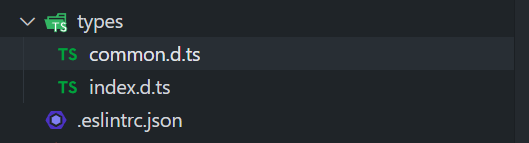
通常自定义
types文件夹下定义的.d.ts文件- 这些类型声明全局可用
- 可以将通用的类型声明定义到单独的
.d.ts文件中
-
或者开发一个库文件同时需要定义声明文件
- 可以在 package.json 文件中的
types字段指定类型的入口文件
export type ResponseType =
    | 'arraybuffer'
    | 'blob'
    | 'document'
    | 'json'
    | 'text'
| 'stream'; - 可以在 package.json 文件中的
declare 声明
-
声明模块:
declare module '模块名' {}- 用于第三方库没有类型声明文件
- 在声明模块的内部,通过
export导出对应库的类、函数等
declare module 'xxx' {
  export function test(): void;
}

/*
* 其他文件中
*/
import { test } from 'xxx'; -
声明文件:
declare module '文件后缀'- 用于导入的静态文件资源的声明
declare module "*.svg";

declare module '*.png' {
  const src: string;
  export default src;
} -
命名空间:
declare namespace 全局变量 {}- 用于声明全局 script 脚本引入的脚本文件中标识符类型声明
declare namespace _ {
  export function join(...args: any[]): string;
}

/**
 * 其他模块中全局可用
 */
_.join(['A', 'B', 'C']);
tsconfig.json
-
tsconfig.json 文件的作用
- 让 TypeScript Compiler 在编译的时候,知道如何去编译 TS 代码和进行类型检测
- 让编辑器可以按照正确的方式识别 TS 代码(对于哪些语法进行提示、类型错误检测等)
-
JavaScript 项目可以使用 jsconfig.json 文件
- 它的作用与 tsconfig.json 基本相同,只是默认启用了一些 JavaScript 相关的编译选项
- 该文件可以让编译器启用 TS 相关的类型提示,获得更好的代码提示
-
文档 中对于 tsconfig.json 文件的配置有详细的介绍,常见配置如下
{
  "compilerOptions": {
    // 目标代码
    "target": "ESNext",

    // 指定需要使用到的库(可以不配置,直接根据 target 指定的目标来自动获取)
    "lib": ["ESNext", "dom"],

    // jsx文件的处理方式 -> preserve: 保留原有的jsx格式
    "jsx": "preserve",

    // 生成代码使用的模块化
    "module": "commonjs",

    // 模块解析规则
    "moduleResolution": "node",

    // 文件路径查找时的基本路径
    "baseUrl": "./",

    // 路径别名,类似 webpack 的 alias
    "paths": {
      "@/*": ["src/*"]
    },

    // 允许导入带有 “.json” 扩展名的模块
    "resolveJsonModule": true,

    // 允许在ts文件中导入js文件
    "allowJs": true,

    // 收到来自 JavaScript 文件的错误消息
    "checkJs": false,

    // 是否生成类型声明文件 .d.ts
    "declaration": true,

    // 是否生成 sourceMap 文件
    "sourceMap": true,

    // 如果指定,所有全局(非模块)文件将编译生成到指定的单个文件中
    // "outFile": "./",

    // 导出文件的路径
    // "outDir": "./",

    // tsc编译时是否去掉注释
    "removeComments": true,

    // 是否不生成js代码,通常用作项目的类型检测
    // "noEmit": true,

    // 是否帮助导入一些需要的功能模块
    "importHelpers": true,

    // 类型检测不通过时不进行编译
    "noEmitOnError": true,

    // 指定生成的类型声明文件的根目录
    // "declarationDir": "./",

    /*
    	allowSyntheticDefaultImports 与 esModuleInterop 通常一起使用
    	作用:允许esModule 和 CommonJs 之间互相调用
    */
    "allowSyntheticDefaultImports": true,
    "esModuleInterop": true,

    // 开启严格模式的总开关
    "strict": true,

    // 跳过对库文件(比如 node_modules 中的第三方库)进行类型检测,仅仅检测用到的类型
    "skipLibCheck": true
  }
}